
![[ArtCraft] - FREE Adobe Alternative!](/_astro/pasted-image-1792594751628.DO1aQ5HU_1HD4Nb.webp)

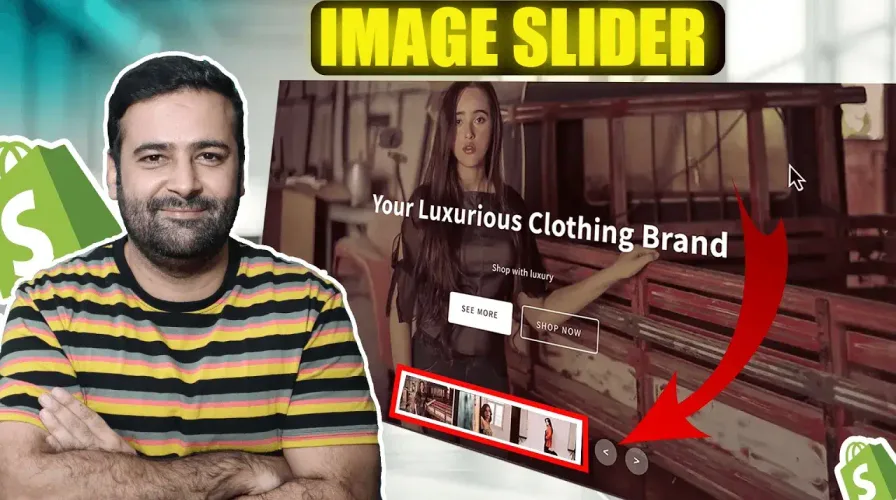
Want to make your Shopify store more interactive? Today, I’ll show you how to add a sleek custom content slider without any complex coding. I’ll provide all the code you need—just copy, paste, and customize to fit your store’s style.
Animated content slider for shopify
Create a new section called “image-content-slider.liquid” and paste the following code:
{% schema %}
{
  "name": "Image Content Slider",
  "tag": "section",
  "class": "image-content-slider-section",
  "settings": [
    {
      "type": "range",
      "id": "autoplay_speed",
      "min": 3,
      "max": 10,
      "step": 1,
      "unit": "sec",
      "label": "Autoplay Speed",
      "default": 7
    },
    {
      "type": "range",
      "id": "transition_speed",
      "min": 1,
      "max": 5,
      "step": 0.5,
      "unit": "sec",
      "label": "Transition Speed",
      "default": 3
    }
  ],
  "blocks": [
    {
      "type": "slide",
      "name": "Slide",
      "limit": 5,
      "settings": [
        {
          "type": "image_picker",
          "id": "slide_image",
          "label": "Slide Image"
        },
        {
          "type": "text",
          "id": "title",
          "label": "Title",
          "default": "Slide Title"
        },
        {
          "type": "color",
          "id": "title_color",
          "label": "Title Color",
          "default": "#ffffff"
        },
        {
          "type": "textarea",
          "id": "description",
          "label": "Description",
          "default": "Add your description here"
        },
        {
          "type": "color",
          "id": "description_color",
          "label": "Description Color",
          "default": "#ffffff"
        },
        {
          "type": "checkbox",
          "id": "show_first_button",
          "label": "Show First Button",
          "default": true
        },
        {
          "type": "text",
          "id": "first_button_text",
          "label": "First Button Text",
          "default": "SEE MORE"
        },
        {
          "type": "url",
          "id": "first_button_link",
          "label": "First Button Link"
        },
        {
          "type": "checkbox",
          "id": "show_second_button",
          "label": "Show Second Button",
          "default": true
        },
        {
          "type": "text",
          "id": "second_button_text",
          "label": "Second Button Text",
          "default": "SUBSCRIBE"
        },
        {
          "type": "url",
          "id": "second_button_link",
          "label": "Second Button Link"
        }
      ]
    }
  ],
  "presets": [
    {
      "name": "Image Content Slider",
      "blocks": [
        {
          "type": "slide"
        }
      ]
    }
  ]
}
{% endschema %}

<div class="carousel">
    <div class="list">
        {% for block in section.blocks %}
            <div class="item" {{ block.shopify_attributes }}>
                <div class="slide-image">
                    {% if block.settings.slide_image %}
                        {{ block.settings.slide_image | image_url: width: 1500 | image_tag: loading: 'lazy', class: 'slide-img' }}
                    {% else %}
                        {{ 'lifestyle-1' | placeholder_svg_tag: 'placeholder-svg' }}
                    {% endif %}
                </div>
                <div class="content">
                    <div class="author">{{ block.settings.author }}</div>
                    <div class="title" style="color: {{ block.settings.title_color }};">{{ block.settings.title }}</div>
                    <div class="des" style="color: {{ block.settings.description_color }};">{{ block.settings.description }}</div>
                    <div class="buttons">
                        {% if block.settings.show_first_button %}
                            <a href="{{ block.settings.first_button_link }}" class="btn">
                                {{ block.settings.first_button_text }}
                            </a>
                        {% endif %}
                        {% if block.settings.show_second_button %}
                            <a href="{{ block.settings.second_button_link }}" class="btn btn-outline">
                                {{ block.settings.second_button_text }}
                            </a>
                        {% endif %}
                    </div>
                </div>
            </div>
        {% endfor %}
    </div>

    <div class="navigation-controls">
        <div class="thumbnail">
            {% for block in section.blocks %}
                <div class="item" {{ block.shopify_attributes }}>
                    {% if block.settings.slide_image %}
                        {{ block.settings.slide_image | image_url: width: 150 | image_tag: loading: 'lazy', class: 'thumb-img' }}
                    {% else %}
                        {{ 'lifestyle-1' | placeholder_svg_tag: 'placeholder-svg' }}
                    {% endif %}
                </div>
            {% endfor %}
        </div>

        <div class="arrows">
            <button id="prev"><</button>
            <button id="next">></button>
        </div>
    </div>

    <div class="time"></div>
</div>

{% style %}
.carousel {
    position: relative;
    width: 100%;
    height: 100vh;
    overflow: hidden;
}

.carousel .list {
    width: 100%;
    height: 100%;
    position: relative;
}

.carousel .list .item {
    position: absolute;
    inset: 0;
    opacity: 0;
    visibility: hidden;
    transition: opacity {{ section.settings.transition_speed }}s ease, visibility {{ section.settings.transition_speed }}s ease;
}

.carousel .list .item:first-child {
    opacity: 1;
    visibility: visible;
}

.carousel .list .item .slide-image {
    width: 100%;
    height: 100%;
    position: relative;
}

.carousel .list .item .slide-image img {
    width: 100%;
    height: 100%;
    object-fit: cover;
}

.carousel .list .item .slide-image::after {
    content: '';
    position: absolute;
    top: 0;
    left: 0;
    width: 100%;
    height: 100%;
    background: linear-gradient(to bottom, rgba(0,0,0,0.2), rgba(0,0,0,0.5));
}

.carousel .list .item .content {
    position: absolute;
    top: 50%;
    left: 50%;
    transform: translate(-50%, -50%);
    text-align: center;
    color: #fff;
    width: 80%;
    max-width: 800px;
    z-index: 1;
}

.carousel .list .item .author {
    font-size: 1.2em;
    font-weight: 500;
    margin-bottom: 1.5em;
    text-transform: uppercase;
    letter-spacing: 3px;
}

.carousel .list .item .title {
    font-size: 3.5em;
    font-weight: bold;
    margin-bottom: 0.8em;
    line-height: 1.2;
}

.carousel .list .item .des {
    font-size: 1.1em;
    line-height: 1.6;
    margin-bottom: 2.5em;
    max-width: 800px;
    margin-left: auto;
    margin-right: auto;
}

.carousel .list .item .buttons {
    display: flex;
    justify-content: center;
    gap: 20px;
    margin-bottom: 40px;
}

.carousel .list .item .buttons .btn {
    padding: 12px 30px;
    font-size: 1em;
    text-transform: uppercase;
    letter-spacing: 2px;
    border-radius: 5px;
    text-decoration: none;
    transition: all 0.3s ease;
    font-weight: 500;
}

.carousel .list .item .buttons .btn {
    background: #fff;
    color: #000;
}

.carousel .list .item .buttons .btn-outline {
    background: transparent;
    color: #fff;
    border: 2px solid #fff;
}

.navigation-controls {
    position: absolute;
    bottom: 30px;
    left: 0;
    right: 0;
    display: flex;
    justify-content: center;
    align-items: center;
    gap: 30px;
    padding: 0 30px;
    z-index: 100;
}

.carousel .thumbnail {
    display: flex;
    gap: 15px;
    justify-content: center;
    align-items: center;
}

.carousel .thumbnail .item {
    width: 120px;
    height: 70px;
    overflow: hidden;
    border-radius: 5px;
    cursor: pointer;
    border: 2px solid transparent;
    transition: all 0.3s ease;
}

.carousel .thumbnail .item img {
    width: 100%;
    height: 100%;
    object-fit: cover;
}

.carousel .thumbnail .item.active {
    border-color: #fff;
    transform: scale(1.1);
}

.carousel .arrows {
    display: flex;
    gap: 15px;
}

.carousel .arrows button {
    width: 40px;
    height: 40px;
    border-radius: 50%;
    background: rgba(255, 255, 255, 0.3);
    border: none;
    color: #fff;
    font-size: 18px;
    cursor: pointer;
    transition: all 0.3s ease;
    display: flex;
    align-items: center;
    justify-content: center;
}

.carousel .arrows button:hover {
    background: #fff;
    color: #000;
}

.carousel .time {
    position: absolute;
    top: 0;
    left: 0;
    width: 100%;
    height: 3px;
    background: rgba(255, 255, 255, 0.3);
}

.carousel .time::before {
    content: '';
    position: absolute;
    top: 0;
    left: 0;
    height: 100%;
    width: 0;
    background: #f1683a;
    animation: timeProgress {{ section.settings.autoplay_speed }}s linear infinite;
}

@keyframes timeProgress {
    to { width: 100%; }
}

@media screen and (max-width: 1024px) {
    .carousel .list .item .title {
        font-size: 2.8em;
    }

    .carousel .list .item .des {
        font-size: 1em;
    }

    .carousel .thumbnail .item {
        width: 100px;
        height: 60px;
    }
}

@media screen and (max-width: 768px) {
    .carousel .list .item .content {
        width: 90%;
    }

    .carousel .list .item .title {
        font-size: 2em;
    }

    .navigation-controls {
        bottom: 20px;
        padding: 0 20px;
        flex-direction: column-reverse;
        gap: 20px;
    }

    .carousel .thumbnail {
        gap: 10px;
    }

    .carousel .thumbnail .item {
        width: 80px;
        height: 50px;
    }

    .carousel .arrows {
        gap: 10px;
    }

    .carousel .arrows button {
        width: 35px;
        height: 35px;
        font-size: 16px;
    }

    .carousel .list .item .buttons {
        flex-direction: column;
        gap: 15px;
    }

    .carousel .list .item .buttons .btn {
        padding: 10px 25px;
        font-size: 0.9em;
    }
}

@media screen and (max-width: 480px) {
    .carousel .list .item .title {
        font-size: 1.6em;
    }

    .carousel .list .item .des {
        font-size: 0.9em;
    }

    .carousel .thumbnail .item {
        width: 60px;
        height: 40px;
    }
}
{% endstyle %}

<script>
document.addEventListener('DOMContentLoaded', function() {
    const carousel = document.querySelector('.carousel');
    const slides = carousel.querySelectorAll('.list .item');
    const thumbnails = carousel.querySelectorAll('.thumbnail .item');
    const nextBtn = document.getElementById('next');
    const prevBtn = document.getElementById('prev');

    let currentSlide = 0;
    const slideCount = slides.length;
    const autoplaySpeed = {{ section.settings.autoplay_speed | times: 1000 }};
    let autoplayTimer;

    function showSlide(index) {
        slides.forEach(slide => {
            slide.style.opacity = '0';
            slide.style.visibility = 'hidden';
        });

        slides[index].style.opacity = '1';
        slides[index].style.visibility = 'visible';

        thumbnails.forEach((thumb, i) => {
            thumb.classList.toggle('active', i === index);
        });

        clearTimeout(autoplayTimer);
        startAutoplay();
    }

    function nextSlide() {
        currentSlide = (currentSlide + 1) % slideCount;
        showSlide(currentSlide);
    }

    function prevSlide() {
        currentSlide = (currentSlide - 1 + slideCount) % slideCount;
        showSlide(currentSlide);
    }

    function startAutoplay() {
        autoplayTimer = setTimeout(nextSlide, autoplaySpeed);
    }

    nextBtn.addEventListener('click', nextSlide);
    prevBtn.addEventListener('click', prevSlide);

    thumbnails.forEach((thumb, index) => {
        thumb.addEventListener('click', () => {
            currentSlide = index;
            showSlide(currentSlide);
        });
    });

    showSlide(0);
    startAutoplay();
});
</script>
5/5 · 10 votes