![[ArtCraft] - FREE Adobe Alternative!](/_astro/pasted-image-1792594751628.DO1aQ5HU_1HD4Nb.webp)

Looking for an alternative to WPVibe for connecting AI agents to your WordPress site? WPVibe has become a well-known option for linking Claude, ChatGPT, Gemini, and Cursor to WordPress through the Model Context Protocol (MCP) — but it’s not the only way to do it, and it isn’t the right fit for everyone. This guide compares WPVibe alternatives — WSP MCP and the rest of the field — so you can pick the right connector for how you actually work.
Two things tend to send people looking for a WPVibe alternative:
- The hosted relay. WPVibe routes every AI tool call through its own cloud service (mcp.wpvibe.ai) rather than talking to your site directly, which means creating a separate WPVibe account alongside the WordPress plugin itself.
- Daily tool-call limits. WPVibe’s free tier is capped at 100 tool calls a day; going beyond that means moving up through paid tiers, up to $899/yr for the highest allowance.
WSP MCP – AI Agents Connector (Our Top Pick)
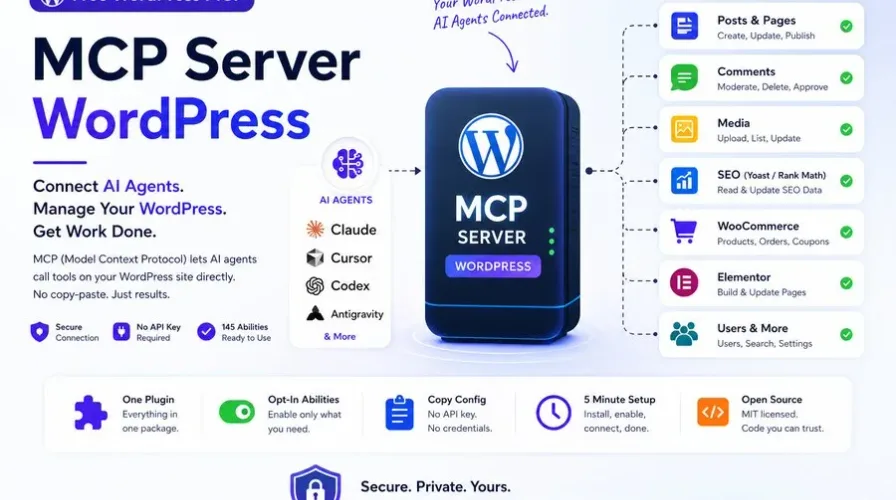
WSP MCP takes the opposite approach: it’s a free, natively self-hosted MCP server built directly into WordPress. There’s no cloud relay, no separate account to create, and no daily call limits to run into — your AI client talks to your own site directly, and everything stays on your own server.
What stands out:
- No hosted relay, no metering. Tool calls go straight from your AI client to your WordPress install — nothing passes through a third-party service, and there’s no daily cap to manage or upgrade around.
- Genuinely free. No paid tiers required to unlock higher usage, unlike WPVibe’s tiered pricing structure.
- Per-ability control, write actions off by default. Every tool — post edits, media uploads, WooCommerce orders, ACF fields, and more — is individually toggled in MCP > Settings.
- Built-in audit log. Every tool call is recorded in your own database (tool, timestamp, user, IP, outcome) — visible only to admins, with nothing sent to an external logging service.
- Deep plugin coverage. Native tool suites for WooCommerce, Advanced Custom Fields, Elementor, Ultimate Addons for Elementor, Gravity Forms, and Yoast SEO.
- Capability-checked on every call. An AI client can only do what the authenticating WordPress user is actually allowed to do.
Best for: Anyone who wants full AI-agent access to WordPress without a metered relay, a separate account, or a recurring bill — from solo site owners to agencies managing several installs.
Get WSP MCP free from the WordPress.org plugin directory → | Full docs at wspmcp.com
WPVibe
WPVibe is a genuinely capable product, and it’s worth being fair about where it’s strong. It pairs a WordPress plugin with a hosted MCP relay, and offers a few things WSP MCP doesn’t build in natively: emulated WP-CLI command support, out-of-the-box coverage for a wide range of page builders (Elementor, Bricks, Breakdance, Beaver Builder, Divi, Gutenberg, Kadence, GeneratePress, SeedProd), a sandboxed theme-editing workflow with draft/preview/rollback, and a white-label mode aimed at agencies managing client sites.
The tradeoff is the hosted architecture: every tool call is relayed through WPVibe’s own service rather than going directly to your site, which means a separate account and a metered daily allowance — 100 calls/day free, rising through Pro ($99/yr), Power ($299/yr), Agency ($599/yr), and Scale ($899/yr) tiers.
Best for: Agencies that specifically want white-labeling, WP-CLI emulation, and broad page-builder coverage out of the box, and don’t mind routing tool calls through a hosted relay.
Other WordPress MCP Options Worth Knowing About
WPVibe isn’t the only alternative out there. A few others come up regularly in this space:
Novamira — A free, open-source, self-hosted plugin that gives AI agents direct PHP execution, file system access, and database queries. It’s powerful, but its own documentation limits it to development and staging environments rather than live sites. A Pro tier (roughly €49/yr) adds persistent memory and specialized support for around three dozen builders and plugins, with agency and lifetime tiers above that.
NibWP — Another self-hosted option, built around a large tool catalog (130+ typed abilities) with strong page-builder awareness for Elementor, Bricks, Kadence, and Etch, plus read-only Figma-to-builder support and integrations across WooCommerce, ACF, FluentCRM, and LearnDash.
AI Engine — One of the most widely installed AI plugins on WordPress.org. Its free tier includes a basic MCP server with around three dozen core tools, but MCP is just one module inside a much larger AI framework; a Pro tier ($79–179/yr, or a lifetime option) unlocks plugin and theme file editing.
Easy MCP AI — A free, self-hosted option with a notably large tool catalog (240+ tools across core, plugin, and data-integration categories), no metering and no paid tier at all, authenticated via OAuth 2.1 with PKCE or bearer tokens with per-tool permissions.
Quick Comparison
| WSP MCP | WPVibe | Novamira | NibWP | AI Engine | Easy MCP AI | |
|---|---|---|---|---|---|---|
| Architecture | Native, self-hosted | Hosted relay | Native, self-hosted | Native, self-hosted | Native, self-hosted | Native, self-hosted |
| Account required | No | Yes | No | No | No | No |
| Cost | Free, no tiers | Free (metered) up to $899/yr | Free, Pro from ~€49/yr | Free / paid tiers | Free, Pro $79–179/yr | Free, no paid tier |
| Tool-call limits | None | Daily caps by plan | None | None | None | None |
| Production-site ready | Yes | Yes | Dev/staging only | Yes | Yes | Yes |
| Audit log | Built-in | — | — | — | — | — |
| WP-CLI emulation | No | Yes | No (direct DB/PHP access instead) | No | No | No |
| White-label mode | — | Yes | — | — | — | — |
Which One Should You Choose?
Choose WSP MCP if you want direct, unmetered, self-hosted access with no external relay and no recurring cost — the simplest and most private setup for most sites. Choose WPVibe if you specifically need its broader out-of-the-box page-builder coverage, WP-CLI emulation, or agency white-labeling, and you’re comfortable with a hosted relay and its usage-based pricing.
Conclusion
Both plugins solve the same core problem — connecting an AI agent safely to WordPress — but take different architectural approaches. If you’d rather keep everything on your own server with no account, no relay, and no metering, WSP MCP is the more straightforward choice. If WPVibe’s specific extras are worth the hosted model and the pricing tiers to you, it remains a solid option.
- AI Engine
- AI WordPress development
- Easy MCP AI
- MCP server WordPress
- NibWP
- Novamira
- WordPress AI automation
- WordPress AI plugin comparison
- WPVibe
- WPVibe alternatives
- WSP MCP